Lumis Web StudioLUMIS
LUMIS STUDENT PORTAL Built for schools

A clearer path
to enrollment.

A white-label portal for your students and staff.
Your brand, a choice of interfaces, and AI where you need it.

Start with our portal. Shape it around your school.

Your students’ next steps, together.Sample data · payments in development
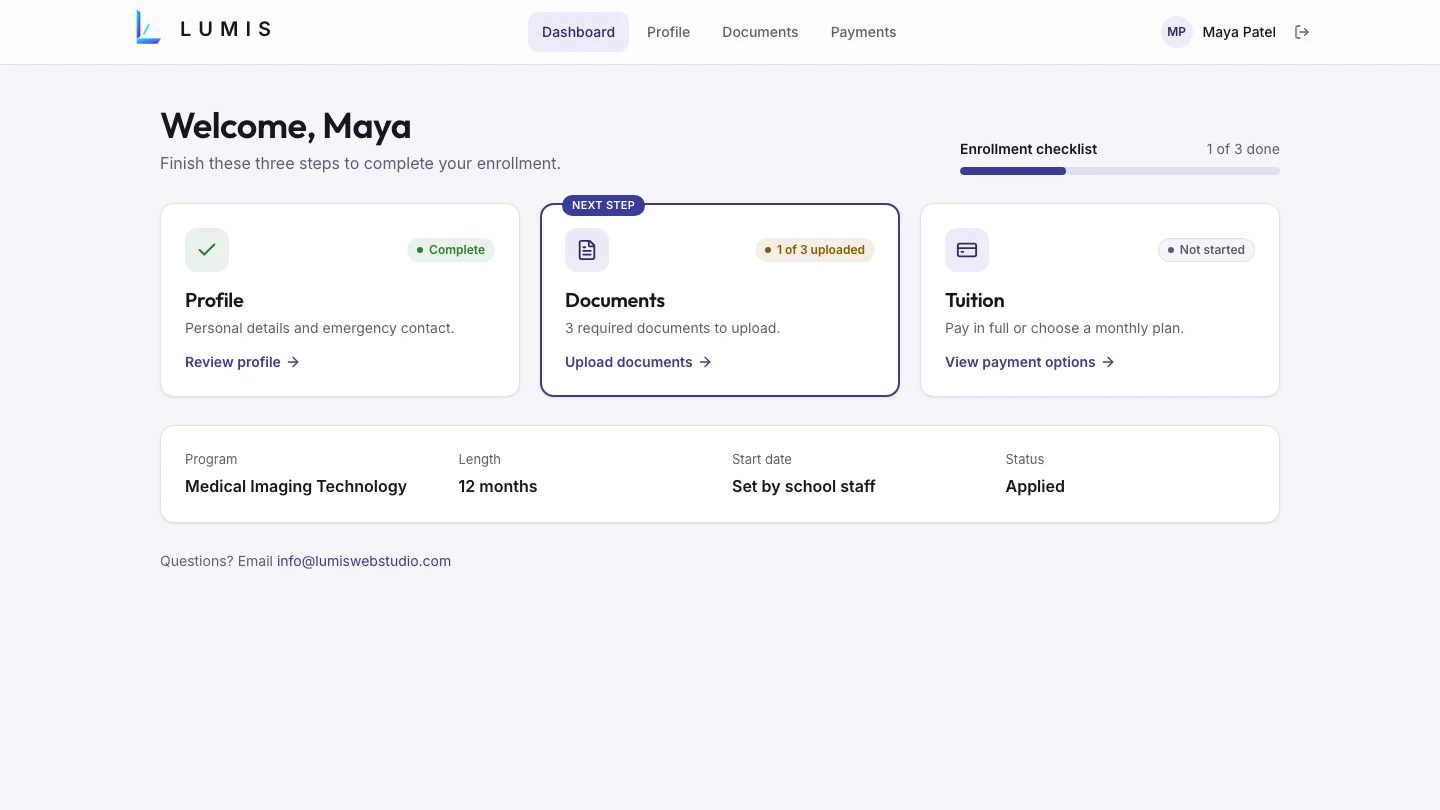
Lumis Student Portal dashboard showing a sample student’s enrollment checklist and document progress.

Clear for students

A profile, a checklist, and a place for every required document.

Organized for staff

Student records, document reviews, and enrollment status in one workspace.

Made for your school

Your branding, programs, fields, and document requirements.

A LOOK INSIDE

Less chasing paperwork.
More moving forward.

Follow the work from a student’s first steps to your team’s final review.

Sample student dashboard with enrollment steps, profile progress and required documents. Open full-size
Actual product screen · sample data

FOR YOUR STUDENTS

A clear next step. Every time.

A personal dashboard brings the enrollment checklist together. Students can see what’s complete, what’s missing, and where to go next.

  • One place for enrollment tasks
  • Profile completion at a glance
  • Document status without the back-and-forth
See it with your team

SEE THE WORKFLOW

From student steps
to staff review.

A short, silent walkthrough of the actual product using sample data. Press play to take a look.

Read the walkthrough description

The walkthrough opens on a student’s enrollment dashboard, then shows the document checklist and review statuses. In the staff workspace, a team member searches for Maya, opens her sample record, and approves a document. All information shown is sample data. No audio is included.

WHITE-LABEL, WITH ROOM TO MAKE IT YOURS

Your brand. Your experience.
One portal foundation.

Start with a branded portal, or shape a custom interface around the way your school works.

Choose the interface you would like to discuss

Your choice helps us tailor the conversation. Custom UI and backend integration work are scoped with you before a proposal.

OPTIONAL AI MODULES

Add intelligence
where it helps.

Choose the capabilities you want to discuss. We’ll confirm data sources, supported actions, and availability for your setup during the demo.

Optional add-on

AI document processing

Less retyping. More reviewing.

Read uploaded documents, extract relevant information, and suggest values for student fields. Your team reviews the suggestions before applying them.

EXAMPLE WORKFLOW

Upload a document → extract details → review and populate fields

Optional add-on

Knowledge assistant

Answers, in your school’s context.

Let students or staff ask questions through chat, using the school information and documents you choose to connect.

EXAMPLE WORKFLOW

Ask about a requirement → find relevant information → get an answer

Optional add-on

Workflow assistant

A conversation that moves work forward.

Go from asking a question to taking an action: find missing documents, prepare follow-ups, or update permitted fields. We define supported actions with your team.

EXAMPLE WORKFLOW

Describe a task → review the proposed action → confirm and run

The portal works without AI. Add-ons are scoped separately from the core experience shown above.

Discuss your setup

ROOM TO GROW

Start with enrollment.
Shape what comes next.

These are directions for future development. They are not included in the current portal, and no release dates are committed.

01In development

Tuition & payment plans

Online checkout, installment plans, and a clearer view of tuition balances.

02Future direction

Digital agreements

Enrollment agreements, consent forms, and signature tracking in the same workflow.

03Future direction

Follow-ups that keep moving

Configurable reminders for missing documents, deadlines, and unfinished steps.

04Future direction

Enrollment insights

Understand where applicants get stuck, how reviews progress, and what needs attention.

05Future direction

Connected school systems

Explore connections with your CRM, student information system, and other tools.

06Future direction

Beyond enrollment

Explore schedules, attendance, course materials, and completion certificates.

Tell us what your school needs next

A FEW GOOD QUESTIONS

Before we meet.

Here’s what to know about the product today.

Who is the portal for?

Schools, career training programs, and education teams that need a clearer way to collect student information, review documents, and manage enrollment. We’ll walk through your process together to see whether it fits.

What does white-label mean here?

Your students use an experience branded for your school. We configure your logo, colors, programs, student fields, required documents, and branded emails. You can also discuss a completely custom interface.

Can we use a custom UI with your backend?

Yes. We can scope a custom student and staff interface connected to the Lumis backend. We review your design, supported workflows, and integration needs together before agreeing on a build.

Are the AI modules included?

AI document processing, the knowledge assistant, and the workflow assistant are optional additions. Choose the modules you want to discuss; we’ll confirm their scope, data sources, supported actions, availability, and pricing for your deployment. They are separate from the core portal walkthrough shown on this page.

Is this a learning management system?

The current product focuses on enrollment, student profiles, and document review. Course delivery, attendance, scheduling, and certificates are outside the current offering.

Does it take tuition payments?

Online tuition payments are in development and are not included in the current offering. The demo focuses on the enrollment and document workflows available today.

What happens after we request a demo?

We’ll email you to arrange a walkthrough, understand your school’s workflow, and discuss setup, support, and pricing. Requesting a demo does not create a student account.

LET’S WALK THROUGH IT

Your school.
Your priorities.
A demo built around both.

We’ll walk through the core portal, discuss your preferred interface, and explore the AI modules you’ve selected.

  • A walkthrough of student and staff workflows
  • White-label or custom UI options
  • AI scope, setup, support, and pricing
Built and supported by Lumisinfo@lumiswebstudio.com

Let’s meet your school.

Tell us a little about your team. We’ll arrange a personal walkthrough.

Your demo interestsChange options
Interface
White-label portal
AI add-ons
None selected — entirely optional

Preferences for discussion. No purchase or commitment.

Your contact and school details

Required fields are marked *. We’ll use your details to respond to this inquiry. Privacy policy.